Filtray vs VSCO: an honest comparison
Two very different routes to a better photo. Here is how Filtray and VSCO compare, and which one to choose.
If you are weighing up Filtray against VSCO, both apps promise a better-looking photo. They just take different routes to get there. This is a fair, side-by-side look at the two, written for someone deciding which one to keep.
The short answer
Choose VSCO if you enjoy the craft of editing: film-inspired presets you tune by hand, a full set of manual tools, and a community feed to share your work. Choose Filtray if you want a strong result quickly. It carries 1,000 filters and uses on-device AI to put the ones that suit your photo first, with no watermark, no account and nothing uploaded. Neither is the wrong answer; they are built for different moods.
What is VSCO?
VSCO is one of the best-known photo apps on the iPhone, built around film-inspired presets. Alongside those presets it offers a full set of manual editing tools (exposure, contrast, colour, grain and the rest) so you can take a shot a long way by hand. It typically runs on a free tier with a paid membership that unlocks the larger preset library and the more advanced tools. It also has a social side: a community feed where you can publish images and follow other photographers. If you enjoy editing as a hobby in its own right, that combination is hard to beat.
What is Filtray?
Filtray comes at the same problem from the other end. Instead of handing you a long list of presets to sift through, it reads the photo first. Its on-device AI looks at brightness, colour, faces and mood, then reorders 1,000 filters so the best-suited appear at the top. Faces in frame bring portrait looks up; golden-hour light brings the warm ones up. Every filter has an intensity slider, and a touch-and-hold compares against the original. You can read more about how the suggestions work if you are curious.
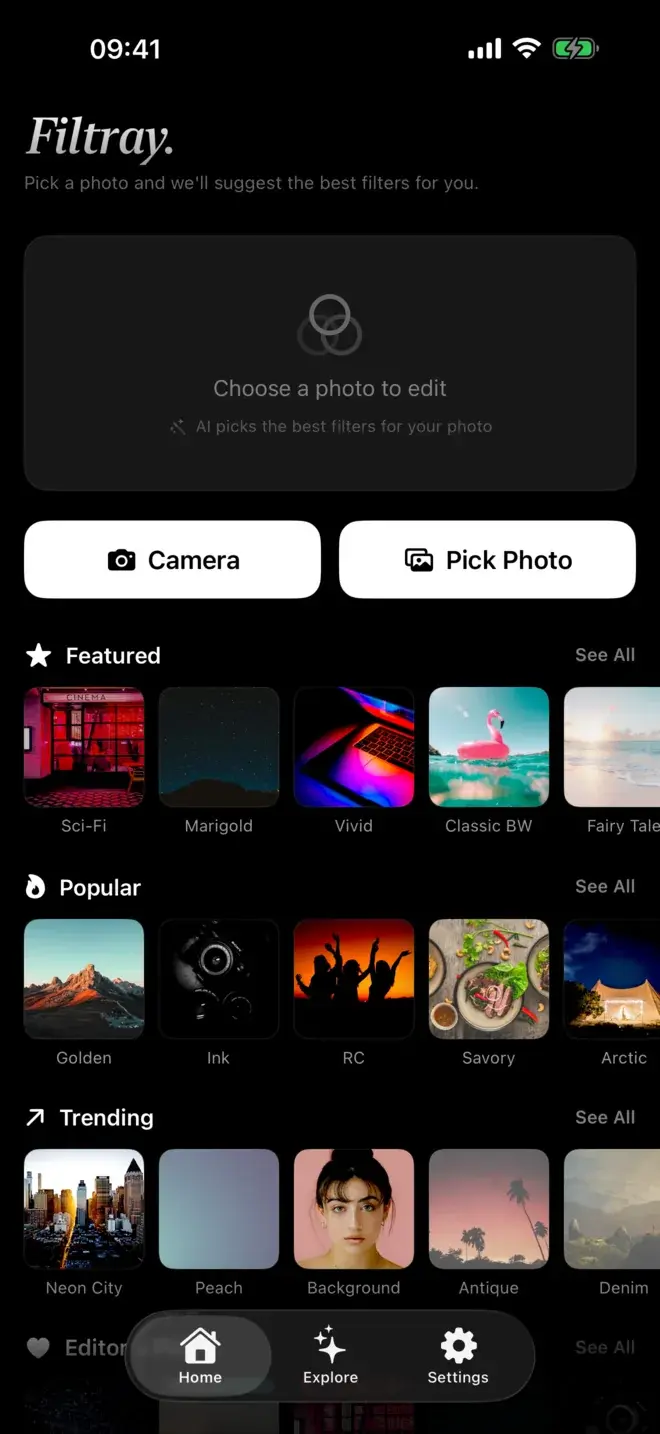
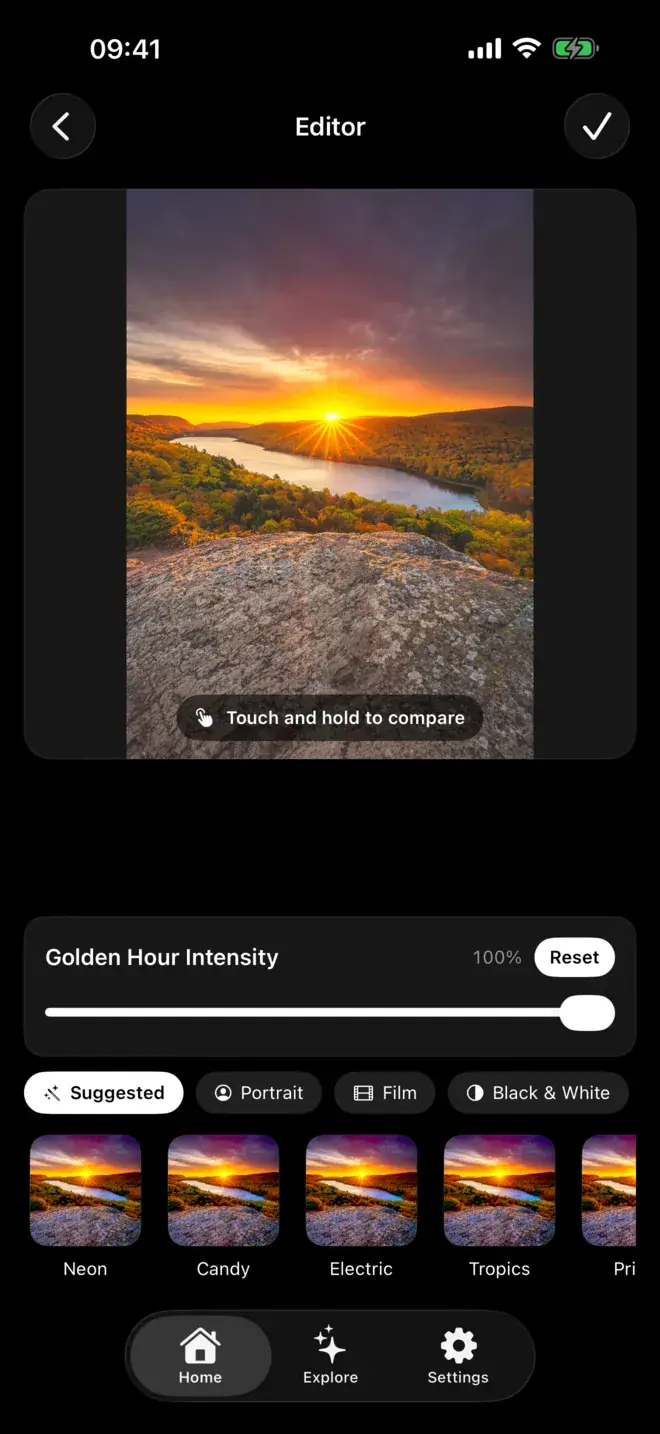
Filtray vs VSCO at a glance
| Filtray | VSCO | |
|---|---|---|
| How you find a look | On-device AI reorders filters to suit each photo | Browse and swipe presets, or search by name |
| Number of presets | 1,000 across 25 categories, 40 in each | A large, film-inspired library, most behind membership |
| AI suggestions | Yes, per photo, on the device | No, you choose presets yourself |
| Export | Full resolution, no watermark | Full-resolution export |
| Account required | No sign-up | Account typically required |
| Community feed | No | Yes |
| Subscription | Free tier (3 per category); Pro unlocks all 1,000 | Free tier; paid membership for the full library and tools |
How do you find the right look?
This is the real difference. VSCO trusts you to know which preset a photo needs, and gives you the tools to refine it. That is satisfying when you have the time and the eye for it. Filtray assumes you would rather not swipe past forty looks that were never going to suit the shot, so it does the first pass for you and puts the likely winners first. You still choose. The slider and the compare gesture are there. You just start from a shortlist rather than from scratch.
Can Filtray do the film look?
Yes. Film, Analog, Retro and Vintage are four of Filtray's 25 categories, each with 40 filters, and the intensity slider lets you keep the effect subtle. If a faded, film-like finish is the whole reason you were looking at VSCO, it is worth reading our guide to getting a film look on iPhone photos first.
Where do your photos go?
Filtray runs entirely on your iPhone. There is no account, no sign-up, and photos are never uploaded. The analysis happens on the device in milliseconds. VSCO, by contrast, typically asks you to create an account, partly because its community feed is built in. If keeping everything local matters to you, that is a real point of difference; we wrote more about on-device editing and privacy separately.
Which should you pick?
Pick VSCO if you love editing for its own sake, want deep manual control alongside presets, and enjoy sharing to and browsing a community feed. It is a mature, well-made app with a loyal following, and it earns it.
Pick Filtray if you want a great-looking photo in a few taps rather than a few minutes, prefer no account and no watermark, and like the idea of the app suggesting the right filter instead of leaving you to hunt. Its free tier gives you three filters in every category to try; Filtray Pro unlocks all 1,000 and turns on suggestions for every photo. It needs iOS 18 or later.
Still comparing? See our roundup of the best filter apps for iPhone, or the Filtray vs Lightroom Mobile comparison if you are leaning towards a pro editor.
Frequently asked questions
Is Filtray a good VSCO alternative?
Filtray is a strong alternative if you want quick results without an account or upload. It offers 1,000 filters and on-device AI that suggests looks for each photo, with no watermark. VSCO remains the better pick if you want hands-on manual editing and a community feed.
Does Filtray have a film look like VSCO?
Yes. Filtray includes Film, Analog, Retro and Vintage among its 25 categories, each with 40 filters, and every filter has an intensity slider so you can dial the effect up or down.
Do Filtray or VSCO add a watermark to exported photos?
Filtray exports at full resolution with no watermark. VSCO typically exports at full resolution as well; the main difference is that Filtray needs no account and never uploads your photos.
Is Filtray free?
Filtray is free to try, with three filters in every category. Filtray Pro unlocks all 1,000 filters and AI suggestions on every photo. It requires iOS 18 or later.
Does VSCO require an account?
VSCO typically requires you to create an account to use the app and its community features. Filtray needs no account or sign-up and runs entirely on your device.

Keep reading
Filtray vs Adobe Lightroom (mobile)
One is a full professional editor. The other gives you a finished look in a tap. Here's how to decide which belongs on your phone.
The best photo filter apps for iPhone in 2026
There is no single best filter app, only the best one for what you are trying to do. Here is how the main options compare, and who each one suits.
How AI filter suggestions work
Why a good filter app can look at your photo and put the right presets first, instead of leaving you to scroll.