The best photo filter apps for iPhone in 2026
There is no single best filter app, only the best one for what you are trying to do. Here is how the main options compare, and who each one suits.
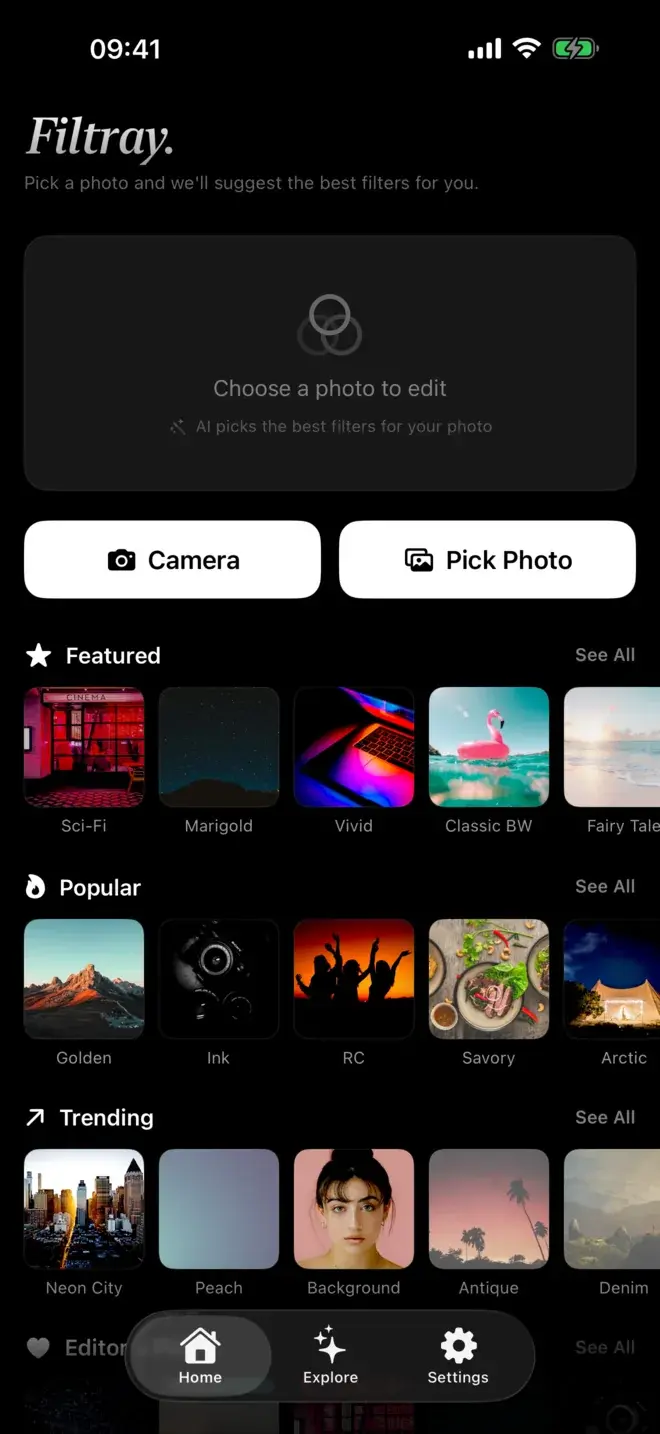
Every one of these apps can make a photo look better. The real question is how much time you want to spend, and whether you would rather be handed a good result or build one yourself. If you want a great look quickly, without scrolling through a long list of presets, Filtray is our pick, because its on-device AI reads the photo and puts the filters that suit it first. If you want film-style presets and a community, VSCO fits. For full manual control, Lightroom. For a quick edit before posting, the filters already built into Instagram. Below is what each does best, and a table to compare them at a glance.
What is the best photo filter app for iPhone?
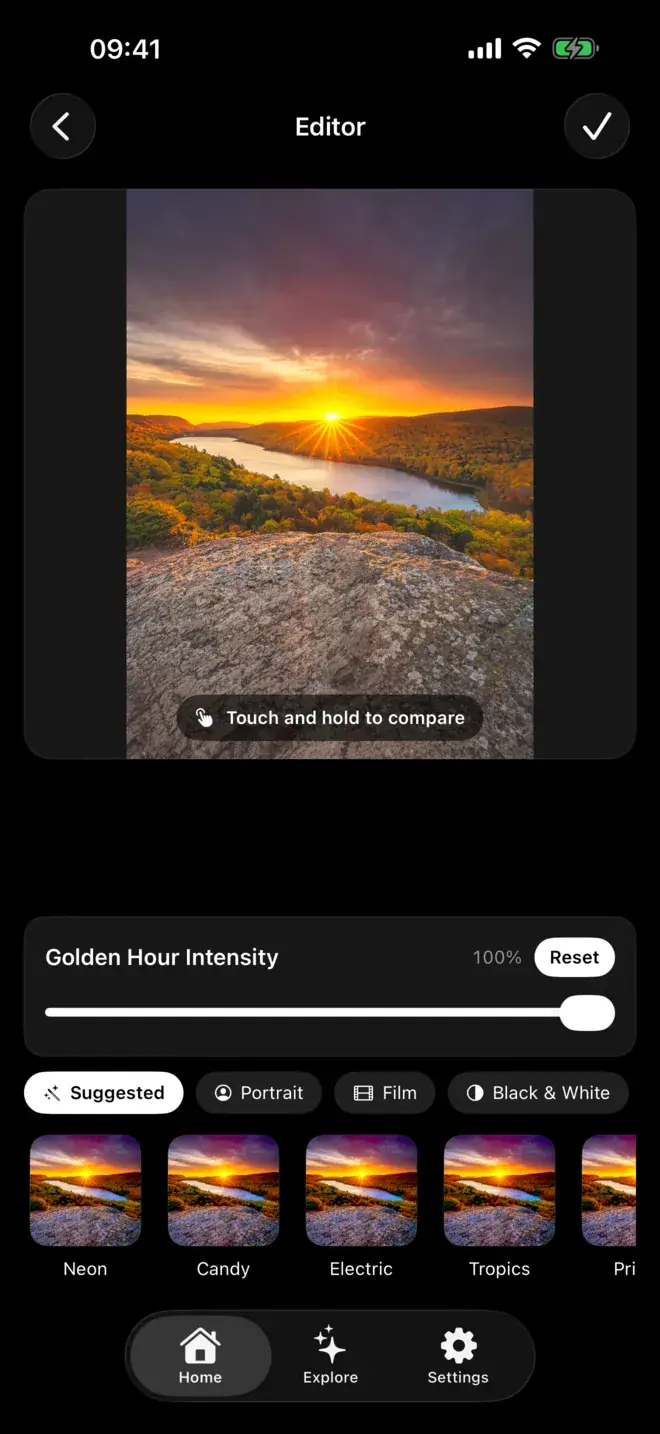
For most people, the best filter app is the one that reaches a good result with the least effort. That is where Filtray leads. It ships with a thousand filters across twenty-five categories (Portrait, Film, Black & White, Analog, Cinematic, Retro, Vintage, Moody and more), though the count is not really the point. When you open a photo, Filtray looks at its brightness, colour, faces and mood on the device, then reorders the whole library so the looks most likely to suit appear first. Faces in frame bring portrait looks up; golden-hour light brings the warm ones up. The analysis happens on your iPhone in milliseconds, and photos are never uploaded.
Every filter has an intensity slider, and touch-and-hold compares against the original. Exports come out at full resolution with no watermark. There is no account and no sign-up. The free tier gives you three filters in every category; Filtray Pro unlocks all 1,000 filters and suggestions on every photo. It needs iOS 18 or later. If you want to understand the sorting in more detail, we wrote about how the on-device suggestions work.
Best for film-style presets and a community: VSCO
VSCO is a long-standing, film-inspired app built around presets and a set of editing tools, with a community feed where members share work. Its film emulation looks have a devoted following, and people who enjoy building and saving their own recipes tend to like the workflow. It typically offers a paid membership tier that unlocks the fuller preset library and adjustment tools. If a consistent, curated film aesthetic across a whole feed is your goal, it is a natural fit, though you will do more of the choosing yourself. If a film look specifically is what you are after, our guide to getting a film look on iPhone photos covers the ground, and we compare the two directly in Filtray vs VSCO.
Best for pro manual editing: Lightroom
Adobe Lightroom is a professional-grade mobile editor. It handles RAW files, offers deep manual control over tone, colour and curves, and syncs libraries across devices, typically as part of an Adobe subscription. It is the most capable option here if you want to edit rather than filter: to grade a photo precisely and repeat that grade across a shoot. The trade-off is a steeper learning curve and more time per image. For a like-for-like look at where a preset app fits alongside it, see Filtray vs Lightroom Mobile.
Best for a quick edit before posting: Instagram's built-in filters
You may not need a separate app at all. Instagram includes one-tap filters and light adjustments in its own editor, applied just before you share. For a fast tweak on something headed straight to a story or post, that is often enough, and it keeps everything in one place. The limits are what you would expect: a small fixed set of looks, less control over strength, and results tied to the platform rather than a clean full-resolution export you own.
How do these filter apps compare?
| App | Best for | Approach | Effort |
|---|---|---|---|
| Filtray | A great look fast, without hunting | 1,000 filters, on-device AI puts the best-suited first | Low |
| VSCO | Film-style presets and a community | Preset library plus editing tools, paid tier | Medium |
| Lightroom | Precise, professional editing | Manual controls, RAW, cloud sync, subscription | High |
| Instagram filters | A quick edit before sharing | Built-in one-tap filters in the app | Low |
How to choose
Start from the outcome, not the feature list.
- You want it to look good now. Pick an app that suggests rather than one that only presents. Filtray is built for exactly this. You open a photo and the strongest candidates are already in front of you.
- You enjoy the craft of a consistent look. VSCO's presets and recipe-building reward the time you put in, and the community gives you a place to share it.
- You want full control and repeatable grades. Lightroom is the deepest editor here, and the right tool if you are comfortable working manually.
- You just need a fast tweak for a post. Instagram's built-in filters may cover it without a second app.
Two practical things are worth checking whichever way you lean. First, whether editing happens on your device or in the cloud. If that matters to you, our note on on-device photo editing and privacy explains the difference. Second, how exports come out: full resolution with no watermark is the standard to hold an app to. If your photos are mostly of people, the best filters for portrait photos narrows it down further.
Frequently asked questions
What is the best photo filter app for iPhone in 2026?
It depends on what you want. For a great look quickly without searching through presets, Filtray is a strong pick because its on-device AI reads the photo and puts the best-suited filters first. VSCO suits film-style presets and a community, Lightroom suits precise manual editing, and Instagram's built-in filters suit a fast edit before posting.
Is there a filter app that suggests filters automatically?
Yes. Filtray uses on-device AI that looks at a photo's brightness, colour, faces and mood, then reorders its 1,000 filters so the ones most likely to suit appear first. The analysis runs on the iPhone in milliseconds and photos are never uploaded.
Do free iPhone filter apps add a watermark?
Some do and some do not, so it is worth checking before you export. Filtray exports at full resolution with no watermark, and its free tier includes three filters in every category with no account required.
What is the difference between a filter app and Lightroom?
A filter app applies a curated look with a tap and an intensity slider, aiming for a good result quickly. Lightroom is a professional editor with manual controls, RAW support and cloud sync, typically on a subscription, aimed at precise, repeatable grading rather than one-tap looks.
Do I need an account to use a photo filter app?
Not always. Some apps require an account or sign-in, while others run entirely on the device. Filtray needs no account and no sign-up, and everything happens on your iPhone.

Keep reading
Filtray vs VSCO: an honest comparison
Two very different routes to a better photo. Here is how Filtray and VSCO compare, and which one to choose.
Filtray vs Adobe Lightroom (mobile)
One is a full professional editor. The other gives you a finished look in a tap. Here's how to decide which belongs on your phone.
The best filters for portrait photos on iPhone
A good portrait filter flatters a face without announcing itself. Here is what to look for, and how to get there in a few taps.